


Cryptoguru: Trading Simulator
4.64.33K Reviews
App Specs
- Version
- 1.5.14
- Updated On
- License
- Free
- Downloads
- 50,000,000+
- Developer
- Crypto Guru Trading Academy and Simulator
- Categories
- Business
- Platform
- Android, iOS
Screenshots



 Analysis by AppCompare
When I judge a trading simulator, I care less about whether it looks like a professional exchange and more about whether it helps me make better decisions without putting money at risk. Cryptoguru: Trading Simulator is aimed at that learning gap: it gives curious newcomers a place to explore crypto trading, while its educational material and practice environment can also give more experienced users a low-stakes way to think through strategies. I’d treat it as a learning tool, not as a shortcut to reliable profits or a substitute for understanding the risks of real markets.
What to expect when you open it
The app is free, and it comes from Crypto Guru Trading Academy and Simulator. It sits in the business category, has an Everyone age rating, and its current version is 1.5.5. Those details make it easy to understand who it is intended to reach, but they don’t tell you how quickly it will feel on your particular phone. In day-to-day use, I’d expect the experience to depend on your device and connection, especially when you’re looking at market information rather than simply reading learning material.
That distinction matters. A simulator can feel responsive while you browse, yet still need a moment to catch up when prices are moving or you switch between charts and trade screens. I wouldn’t judge its usefulness by whether every screen appears instantly; I’d pay attention to whether the information is current enough for the exercise I’m doing and whether I can follow the order of a practice trade without losing track of my reasoning.
When the app gets more demanding
The more useful test is a session with several tasks: check a chart, compare a few assets, review a tutorial, then return to a practice position. That is where a learning simulator either supports a routine or becomes a distraction. If you’re using Cryptoguru in short bursts, such as during a commute or between other tasks, it makes sense to choose one question before opening it: am I learning a term, watching a price move, or testing a trade idea? A narrow goal keeps a busy screen from turning into aimless tapping.
There is also a trade-off in using market movement as a teaching aid. Real-time prices can make practice feel more connected to the market, but fast changes can tempt a beginner to chase every movement. I’d use a quiet session to write down why I would enter and exit a simulated position, then check later whether the reasoning held up. That creates a more useful lesson than repeatedly reacting to whatever has just moved.
Reliability and practical limits
For a practice app, reliability is about more than avoiding a crash. I want to know whether I can return to a learning session, understand what I was trying to do, and distinguish a simulated decision from a real one. Before relying on any trading simulator as a record of your progress, make a habit of noting the idea behind a trade in your own words. That small step helps if you leave the app and come back later, and it prevents a virtual balance from becoming the only measure of whether a strategy is sensible.
I also wouldn’t treat a successful simulated trade as proof that the same move would work with real money. Practice removes the emotional pressure of a real loss, and that changes how people behave. A simulator is strongest when it helps you spot habits—such as entering because a price is rising or changing a plan too quickly—not when it encourages confidence based on a few good outcomes.
Worth Reading Before You Choose

Baby Panda World Brings Quick Play to Modern Phones, but Its Game Library Feels Busy

ESPN’s Live Game View Makes Following Close Games Easier

QuizzLand Review: A Good Fit for Short Trivia Breaks, Not Every Player

Basketball Stars: Multiplayer Is Fast, but Can It Recover When Matches Go Wrong?

WEBTOON Turns Phone Updates Into a Better Reading Routine

Link to Windows Runs on Shared Habits, Not Social Feeds
Choosing the right device and routine
Cryptoguru requires Android 8.0 or later. If you’re using an older phone, check compatibility before planning around it. On a supported device, I’d still keep expectations practical: charts and market data may be more comfortable to study on a larger screen, while a phone is convenient for brief checks and lessons. If you notice sluggishness, close other demanding apps and try again before assuming the simulator itself is the problem.
It has an average rating of 4.5 from around 293,000 ratings, and more than 10 million installs. That broad reach suggests many people have tried it, but I’d make my own decision based on whether the learning approach suits me. It was released on October 9, 2023, and has around 3,800 written reviews; neither popularity nor a rating can tell you whether its teaching style matches the way you learn.
Getting Started with Cryptoguru
First things first, setting up Cryptoguru: Trading Simulator is a breeze. The app is available for both Android and iOS, so you can find it in your respective app store. Once downloaded, the installation is quick and straightforward. You’ll be guided through a simple registration process, and boom, you’re ready to jump into the exciting world of crypto trading.
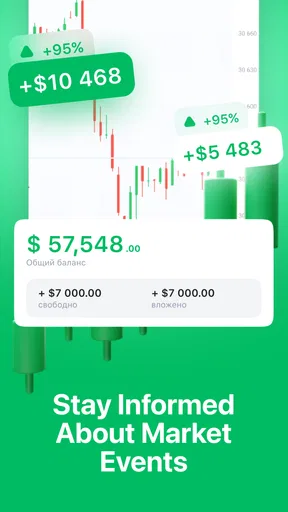
When you open the app, you’re greeted with a sleek and intuitive interface. It’s designed to be user-friendly, which is perfect for beginners who might be feeling a bit daunted. The main dashboard displays your portfolio, trending cryptocurrencies, and a nifty chart showing market trends.
Simulated Trading Experience
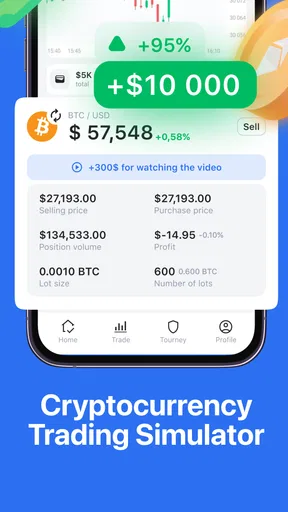
Now, let’s talk about the main feature of this app – the trading simulator. It’s like having a crypto trading playground where you can experiment without any real financial consequences. You start off with a virtual balance, and from there, you can trade popular cryptocurrencies like Bitcoin, Ethereum, and many others.
One of the coolest things about this simulator is how realistic it feels. The app pulls real-time data from the market, so you get a genuine sense of how the crypto world operates. You can practice buying, selling, and even shorting cryptos. It’s a fantastic way to learn how to read market trends, understand price movements, and develop strategies.
Educational Tools and Features
What sets Cryptoguru: Trading Simulator apart from other trading apps is its focus on education. The app is packed with tutorials and guides that explain the basics of crypto trading and advanced strategies. Whether you’re a total newbie or someone with a bit of experience, there’s something valuable here for everyone.
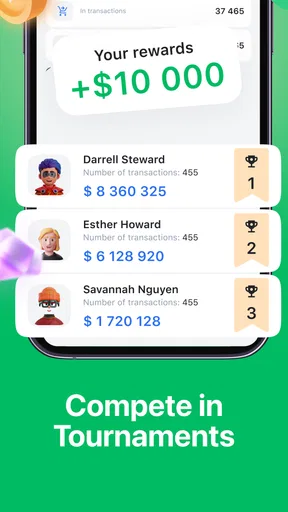
There’s also a community feature where you can connect with other users. You can share strategies, discuss market trends, and even participate in challenges. It’s a great way to learn from others and grow your knowledge base.
User Experience and Interface
The developers have clearly put a lot of thought into the user experience. The app is not only functional but also visually appealing. The color scheme is easy on the eyes, and the layout is intuitive. Navigating through different sections of the app is smooth, and everything is where you’d expect it to be.
Additionally, the app runs smoothly without any noticeable lag. This is crucial when you’re trying to simulate trades based on real-time data. Plus, it’s regularly updated to ensure that you have the latest features and bug fixes.
Using the simulator as a learning routine
One practical way to get value from a virtual balance is to treat it like a limited budget rather than a score to inflate. Decide on a simple rule before placing a practice trade—for example, what change in your view would make you exit—and write it down. When you return to the chart, compare the result with the reason you gave yourself at the start. This helps separate a considered decision from a lucky outcome.
A realistic everyday scenario might be a beginner checking the market after work, choosing one asset to observe, and making a single simulated trade only if they can explain the idea behind it. The point is not to imitate a full-time trader. It is to build a repeatable habit: notice a movement, form a hypothesis, and later review whether the evidence supported it. Tutorials can help with terminology, while the simulator gives that terminology a practical context.
Another useful exercise is to compare two approaches without changing several things at once. You might test a patient entry against a more reactive one in separate sessions, keeping notes about what you expected and what happened. This won’t prove that either method will work in a live account, but it can reveal whether you tend to abandon a plan or follow a trend without a clear reason. That kind of self-observation is more valuable than trying to guess the next price move.
How it compares with other ways to learn
Compared with watching videos or reading a beginner’s guide, a simulator makes it easier to connect concepts to decisions: you can see a chart, consider a trade, and observe the result without risking cash. The trade-off is that practice can’t reproduce the pressure of a real financial loss. For someone who wants structured explanations above all else, a course or book may be a better starting point; for someone who learns by trying, the combination of lessons and simulated trading is more engaging.
Compared with a live exchange, Cryptoguru is the safer place to rehearse the mechanics and think through a strategy, but it is not where I’d go to execute actual investments. A live trading platform is built for real transactions and brings real financial consequences; that is precisely why a beginner may benefit from practicing elsewhere first. Keep the distinction clear: familiarity with a simulator can help you ask better questions, but it does not guarantee that you are ready to trade real money.
The community element can add another perspective, especially when users discuss why they made a decision. I’d still treat other people’s strategies as prompts to examine rather than instructions to copy. A confident-sounding explanation may not fit your goals or risk tolerance, and a challenge can make trading feel competitive when careful learning is the better objective. Use discussion to find questions worth investigating, not to outsource your judgement.
Who will get the most from it
I think the app is best suited to a curious beginner who wants to understand trading vocabulary and test ideas before approaching a live market. It can also suit someone who already follows crypto and wants a low-stakes space to rehearse buying, selling, or shorting. If you only have a few minutes, a focused lesson or one deliberate chart review is a better use of the session than trying to monitor every asset at once.
It is less suitable for someone looking for investment recommendations, guaranteed outcomes, or a full replacement for a professional trading platform. It may also frustrate a learner who wants a carefully sequenced classroom-style course and little interaction with market charts. In that case, starting with a structured educational resource and returning to the simulator to practice specific concepts could be a better order.
If you’re wondering whether you need trading experience, I’d say no: the appeal is that you can begin with basic concepts and gradually test more involved ideas. If you’re asking whether the practice balance represents money you can withdraw, the important point is to treat it as virtual learning capital, not an account for making real investments. And if you’re deciding whether the app can teach you to profit, I wouldn’t make that promise on its behalf; it can help you practice, while results in a real market involve risks that practice cannot remove.
Final Thoughts
All in all, Cryptoguru: Trading Simulator is a fantastic tool for anyone interested in cryptocurrency trading. Whether you’re just curious about how trading works or you’re serious about honing your skills, this app offers something for everyone. It’s educational, engaging, and most importantly, risk-free.
So, if you’ve ever thought about dipping your toes into the crypto market, why not give Cryptoguru a try? It’s a fun way to learn, practice, and prepare yourself for the real deal. Happy trading!
My performance verdict is positive but measured: I’d use it for short, intentional sessions, not as a screen I leave open all day. The virtual environment, market context, and learning material make it a sensible place to begin exploring crypto decisions, while the best results come from bringing your own notes and resisting the urge to treat a practice win as proof. For a free business app with an Everyone rating, that balance makes it approachable; just keep its role clear and move to another kind of resource when you need deeper instruction or real transaction tools.
Pros
- Intuitive interface for easy navigation.
- Realistic trading scenarios enhance learning.
- Wide range of cryptocurrencies available.
- Detailed analytics to track progress.
- No real money needed
- risk-free learning.
Cons
- Limited to simulated market conditions.
- No multiplayer or social interaction features.
- Requires internet for full functionality.
- Ads can be intrusive during use.
- Lacks in-depth tutorials for beginners.
FAQs for Cryptoguru: Trading Simulator
What is Cryptoguru: Trading Simulator?
Cryptoguru: Trading Simulator is an educational app designed to teach users the fundamentals of cryptocurrency trading without the risk of real financial loss. The app offers a virtual trading environment where users can practice strategies, analyze market trends, and improve their trading skills using simulated funds.
How does the trading simulation work in Cryptoguru?
In Cryptoguru, users are provided with a virtual portfolio and access to real-time market data. They can execute trades using simulated funds, allowing them to experience the dynamics of cryptocurrency trading. The app uses historical data to mimic market conditions, enabling users to test strategies and learn from their successes and mistakes.
Is Cryptoguru suitable for beginners?
Yes, Cryptoguru is ideal for beginners. The app offers a user-friendly interface and educational resources to help new traders understand the basics of cryptocurrency markets. Tutorials and guides are available to explain trading strategies, market analysis, and risk management, making it accessible for those with limited trading experience.
Does Cryptoguru include real-time market data?
Absolutely, Cryptoguru incorporates real-time market data to provide an authentic trading experience. By using live data, users can track the performance of major cryptocurrencies and see how their virtual trades would perform in the actual market. This feature is crucial for practicing realistic trading scenarios.
Are there any costs associated with using Cryptoguru?
Cryptoguru offers a free version with access to basic features, allowing users to start learning without any upfront costs. However, there may be in-app purchases or subscription options that provide advanced features, such as additional educational content, premium trading tools, or ad-free experiences. Always check the app store for the latest pricing details.


